schema markup for small business
What Is Schema Markup? The 5 Types a Small Business Actually Needs
Schema markup helps Google and AI tools understand who you are and what you offer. These are the 5 types most small businesses need, and what each one does.
Technical SEOUpdated 2 min readBy Kanchana Delgoda, Search and AI visibility
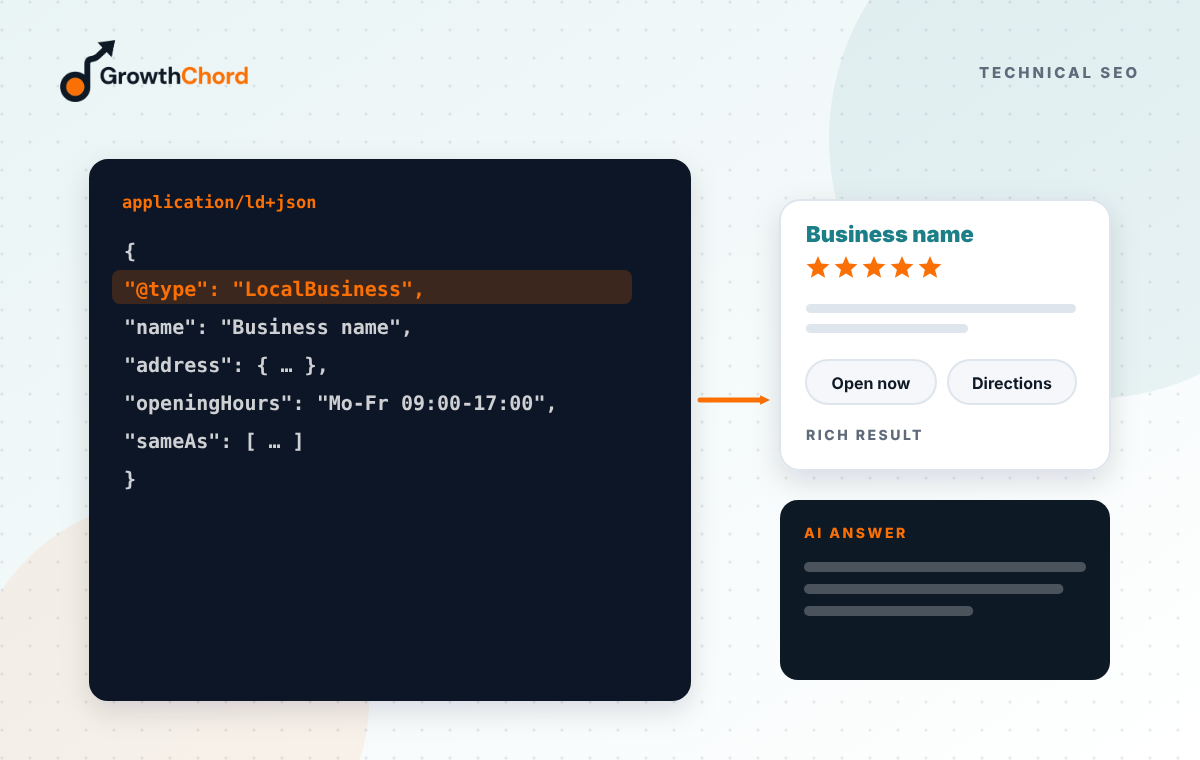
Short answer: schema markup is code that labels the information on your page so machines understand it, such as "this is a business, this is its address, these are its opening hours". Most small businesses need five types: LocalBusiness or Organization, Service, FAQPage, BreadcrumbList, and Article for blog posts.
When a person reads your contact page, they know which line is the phone number. A machine only sees text. Schema markup adds labels so Google, Bing and AI tools can read your details without guessing.
What is schema markup, simply?
A small block of code, usually in a format called JSON-LD, added to a page. Visitors never see it. It uses a shared vocabulary from schema.org that search engines and AI tools understand.
Which 5 types does a small business need?
1. LocalBusiness or Organization. Your name, address, phone, hours, logo, website and social profiles. Put it on your homepage and contact page. Choose a more specific type if one fits, such as Dentist or Restaurant.
2. Service. Describes each service, the area you serve and who provides it. Add it to each service page.
3. FAQPage. Marks up questions and answers that are visible on the page. AI tools and search engines find these easy to lift.
4. BreadcrumbList. Shows where a page sits in your site, like Home, then Services, then Local SEO. It helps search engines understand your structure.
5. Article or BlogPosting. For blog posts: headline, author, publish date and update date. It supports freshness and authorship signals.
What else might you need?
Products with prices for shops, Event for events, Review for genuine third-party reviews where allowed, and Person for team profiles. Use only what matches real content on the page.
How do you add it?
Many platforms add basic schema automatically. SEO plugins add more. For custom sites, a developer writes it once in the page template, so every new page gets it.
How do you check it is working?
Use Google's Rich Results Test or the Schema Markup Validator. Fix errors first, then warnings if they matter for your type of business. Check Search Console for enhancement reports.
What mistakes should you avoid?
Marking up content that is not visible, using the wrong business type, copying schema from another site with their details, and adding star ratings you collected yourself in a way Google does not allow.
Every site we build through web development includes this schema. Want to see what your site is missing? Request a free growth audit.
- Technical SEO
- Core Web Vitals
- Crawlability