core web vitals small business
Is Your Slow Website Costing You Enquiries? Core Web Vitals in Plain English
Core Web Vitals sound technical, but they measure what customers feel: how fast a page shows, reacts and stays still. What each one means and how to fix it.
Technical SEOUpdated 2 min readBy Kanchana Delgoda, Search and AI visibility
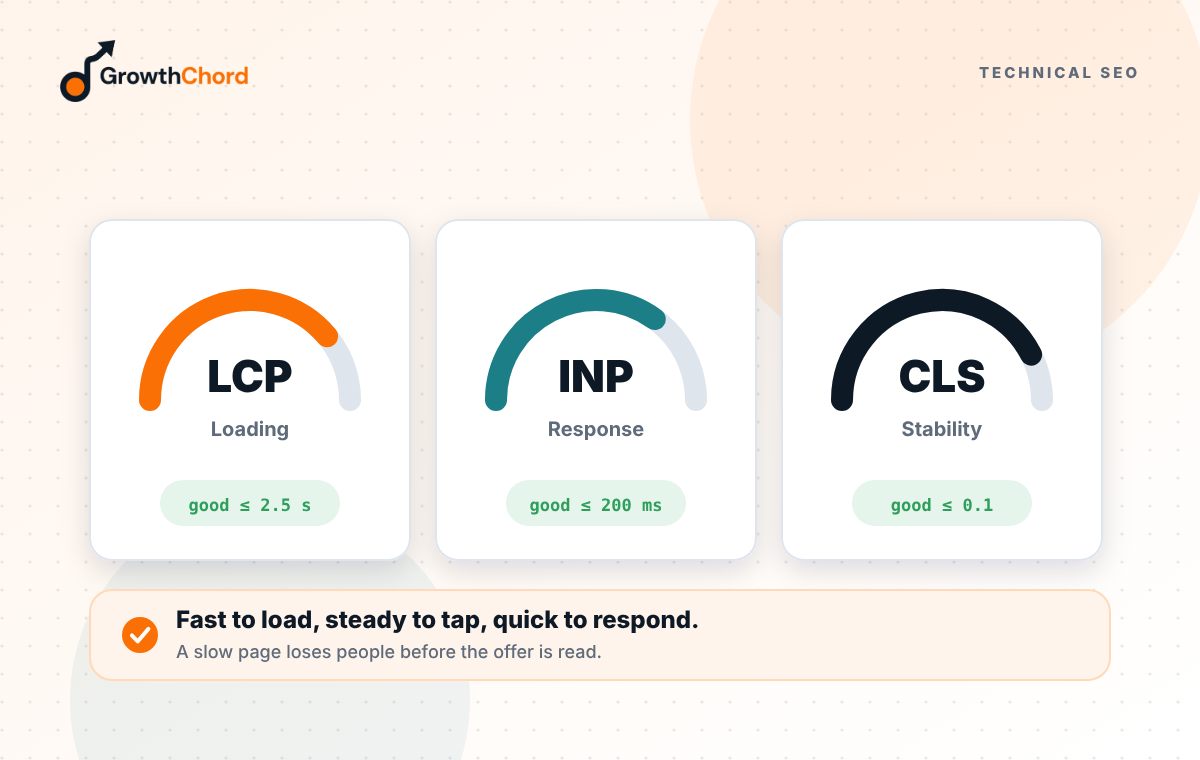
Short answer: Core Web Vitals measure three things a customer feels: how quickly the main content appears, how fast the page reacts when they tap, and whether things jump around while it loads. They matter for Google, but they matter more for enquiries, because slow, jumpy pages lose people on mobile before they ever see your phone number.
Your web developer says the site "passes", but it still feels slow on your phone. Or Search Console shows a red warning about Core Web Vitals and you do not know what it means. Here it is in plain words.
What do the three measures mean?
Largest Contentful Paint (LCP): how long until the biggest thing on screen, usually the main image or headline, appears. Slow LCP means visitors stare at a blank or half-loaded page.
Interaction to Next Paint (INP): how quickly the page responds when someone taps a button or menu. Poor INP feels like the site is frozen.
Cumulative Layout Shift (CLS): how much the page moves while loading. High CLS is when you go to tap "Call" and an image pushes the button down, so you tap an ad or nothing.
Why do they matter for a business website?
Because the people visiting a service page are often ready to act. A page that loads slowly on mobile data, or jumps when they try to tap, frustrates them at exactly the wrong moment. Many simply go back to Google and choose the next business.
What usually causes the problems?
- Huge, uncompressed images, especially sliders on the homepage.
- Too many plugins, chat widgets and tracking scripts.
- Fonts and images that load late and push content around.
- Cheap or overloaded hosting.
- Page builders that add a lot of hidden code.
What fixes make the biggest difference?
- Compress and resize images, and use modern formats like WebP.
- Remove the slider and any plugin you do not need.
- Reserve space for images and ads so the layout does not jump.
- Load chat widgets and tracking scripts after the main content.
- Use better hosting, ideally with a server close to your customers.
How do you check your site?
Run your homepage and your top service page through PageSpeed Insights on mobile. Look at the field data if available, since that reflects real visitors. Fix the biggest issue first, then test again.
Is a perfect score necessary?
No. Aim for "good" on the pages that bring enquiries. A perfect lab score on a page nobody visits is less useful than a fast, clear service page.
Our web development builds fast sites from the start. Want to know what is slowing yours down? Request a free growth audit.
- Technical SEO
- Core Web Vitals
- Crawlability