update old blog posts seo
Old Blog Posts Losing Traffic? What to Update First in 2026
Traffic slipping on pages that used to work? Before writing anything new, update these pages first. A simple order of priority that protects your best traffic.
Content StrategyUpdated 2 min readBy Kanchana Delgoda, Search and AI visibility
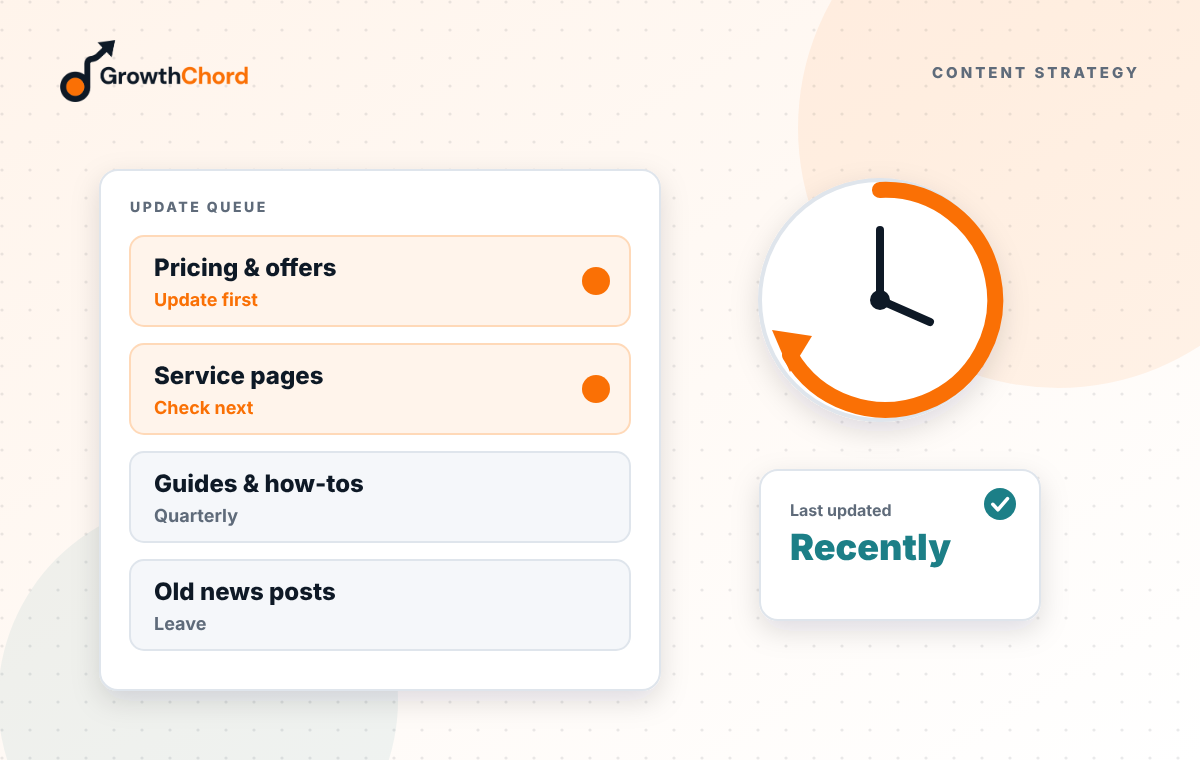
Short answer: update in this order: pages that bring enquiries and are slipping, pages that rank just below the top results, pages with out-of-date prices, facts or screenshots, and finally popular posts with a low click rate. Keep the same URL, make real improvements, and show the updated date.
Writing new posts feels productive. But on most business sites, the quickest gains come from fixing pages that already have some traction. Google already knows them. They just need to be better than they were.
Which pages should you update first?
1. Money pages that are slipping. Service and location pages, or posts that lead to enquiries, where clicks have dropped over the last three to six months. Losing these costs real customers.
2. Pages ranking just below the top. In Search Console, find pages with an average position around 5 to 15. A stronger answer, better title or a few internal links can lift them into the top results.
3. Pages with outdated facts. Old prices, old regulations, old tool screenshots or references to last year. Readers and AI tools both lose trust in out-of-date pages.
4. Pages with many impressions but few clicks. The page is being seen but not chosen. Rewrite the title and description to answer the search more directly.
What does a real update include?
- A direct answer at the top, in the first two sentences.
- Current prices, dates, rules and examples.
- New questions people now ask, added as headings.
- Removing sections that are no longer true or useful.
- Fresh internal links to newer pages.
- An updated date shown on the page.
What does not count as an update?
Changing the date only, adding a few keywords, or rewording sentences without improving the answer. Google and readers can tell.
How do you find these pages quickly?
In Search Console, compare the last three months with the same period before. Sort by clicks lost. That list is your update queue.
How often should you check?
Monthly for your top ten pages, quarterly for the rest. Put a reminder in your calendar.
We run this review in our SEO service. Want a list of your pages that need updating first? Request a free growth audit.
- Content Strategy
- Topic Clusters
- Editorial Planning